
[1]:
# This information helps with debugging and getting support :)
import sys, platform
import pandas as pd
import bifacial_radiance as br
print("Working on a ", platform.system(), platform.release())
print("Python version ", sys.version)
print("Pandas version ", pd.__version__)
print("bifacial_radiance version ", br.__version__)
Working on a  Windows 10
Python version  3.11.8 | packaged by conda-forge | (main, Feb 16 2024, 20:40:50) [MSC v.1937 64 bit (AMD64)]
Pandas version  2.2.3
bifacial_radiance version  0.5.0b2.dev4+gedb973d.d20250924
22 - Mirrors and Modules#
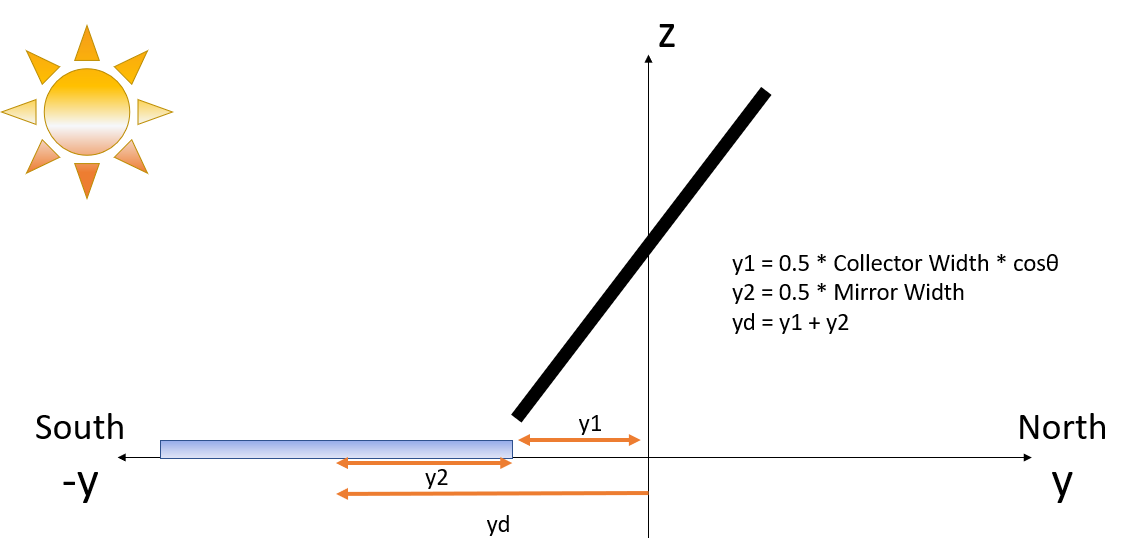
Doing an example tutorial for example brought up in Issue #372
[2]:
import os
from pathlib import Path

testfolder = str(Path().resolve().parent.parent / 'bifacial_radiance' / 'TEMP' / 'Tutorial_22')
if not os.path.exists(testfolder):
    os.makedirs(testfolder)

print ("Your simulation will be stored in %s" % testfolder)
Your simulation will be stored in C:\Users\cdeline\Documents\Python Scripts\Bifacial_Radiance\bifacial_radiance\TEMP\Tutorial_22
[3]:
import bifacial_radiance
import numpy as np
import pprint
import pandas as pd
[4]:
demo = bifacial_radiance.RadianceObj('tutorial_22', path=testfolder)  # Adding a simulation name. This is optional.
demo.setGround(0.2)
epwfile = demo.getEPW(lat=37.5, lon=-77.6)
metdata = demo.readWeatherFile(weatherFile=epwfile, coerce_year=2021)
timeindex = metdata.datetime.index(pd.to_datetime('2021-01-01 12:0:0 -5'))
demo.gendaylit(timeindex) # Choosing a december time when the sun is lower in the horizon
path = C:\Users\cdeline\Documents\Python Scripts\Bifacial_Radiance\bifacial_radiance\TEMP\Tutorial_22
Loading albedo, 1 value(s), 0.200 avg
1 nonzero albedo values.
Getting weather file: USA_VA_Richmond.724010_TMY2.epw
 ... OK!
8760 line in WeatherFile. Assuming this is a standard hourly WeatherFile for the year for purposes of saving Gencumulativesky temporary weather files in EPW folder.
Coercing year to 2021
Saving file EPWs\metdata_temp.csv, # points: 8760
Calculating Sun position for Metdata that is right-labeled  with a delta of -30 mins. i.e. 12 is 11:30 sunpos
[4]:
'skies\\sky2_37.5_-77.33_2021-01-01_1200.rad'
1. Create your module and evaluate irradiance without the mirror element#
[5]:
tilt = 75
sceneDict1 = {'tilt':tilt,'pitch':5,'clearance_height':0.05,'azimuth':180,
              'nMods': 1, 'nRows': 1, 'originx': 0, 'originy': 0, 'appendRadfile':True}
mymodule1 = demo.makeModule(name='test-module',x=2,y=1, numpanels=1)
sceneObj1 = demo.makeScene(mymodule1, sceneDict1)
Module Name: test-module
Module test-module updated in module.json
Pre-existing .rad file objects\test-module.rad will be overwritten
[6]:
octfile = demo.makeOct(demo.getfilelist())
analysis = bifacial_radiance.AnalysisObj(octfile, demo.basename)
frontscan, backscan = analysis.moduleAnalysis(sceneObj1, sensorsy=1)
results = analysis.analysis(octfile, demo.basename, frontscan, backscan)
Created tutorial_22.oct
Linescan in process: tutorial_22_Row1_Module1_Front
Linescan in process: tutorial_22_Row1_Module1_Back
Saved: results\irr_tutorial_22_Row1_Module1.csv
[7]:
pwd
[7]:
'C:\\Users\\cdeline\\Documents\\Python Scripts\\Bifacial_Radiance\\bifacial_radiance\\TEMP\\Tutorial_22'
[8]:
withoutMirror = bifacial_radiance.load.read1Result('results\irr_tutorial_22_Row1_Module1.csv')
withoutMirror
[8]:
| x | y | z | rearZ | mattype | rearMat | Wm2Front | Wm2Back | Back/FrontRatio | rearX | rearY | |
|---|---|---|---|---|---|---|---|---|---|---|---|
| 0 | 0.0 | -0.024 | 0.54 | 0.532 | a0.0.a0.test-module.6457 | a0.0.a0.test-module.2310 | 140.203 | 64.904 | 0.463 | 0.0 | 0.005 |
2. Add Mirror#
Approach 1: Pretend the mirror is another module.#
We start by creating the mirror material in our ground.rad file, in case it is not there. For mirror or glass primitives (material classes), pecularity and roughness are not needed.
You could alternatively do a plastic material, and increase the specularity and lower the roughness to get a very reflective surface.
[9]:
demo.addMaterial(material='testmirror', Rrefl=0.94, Grefl=0.96, Brefl=0.96,
         materialtype = 'mirror') # specularity and roughness not needed for mirrors or glass.
Material exists, overwriting...

Added material testmirror to file ground.rad
[10]:
mymodule2 = demo.makeModule(name='test-mirror',x=2,y=1, numpanels=1, modulematerial='testmirror')
Module Name: test-mirror
Module test-mirror updated in module.json
Pre-existing .rad file objects\test-mirror.rad will be overwritten
We calculate the displacement of the morrir as per the equations show in the image at the beginning of the tutorial
[11]:
originy = -(0.5*mymodule2.sceney + 0.5*mymodule1.sceney*np.cos(np.radians(tilt)))
Make a second sceneObj and add to the octfile. Append=True required, otherwise the second scene will overwrite the first!
[12]:
sceneDict2 = {'tilt':0,'pitch':0.00001,'clearance_height':0.05,'azimuth':180,
              'nMods': 1, 'nRows': 1, 'originx': 0, 'originy': originy, 'appendRadfile':True}
sceneObj2 = demo.makeScene(mymodule2, sceneDict2, append=True)
Additional scene Scene1 created! See list of names with RadianceObj.scenes and sceneNames
[13]:
octfile = demo.makeOct(demo.getfilelist())
Created tutorial_22.oct
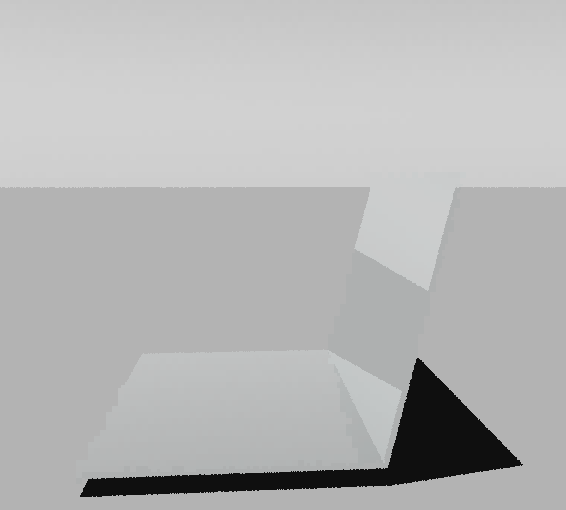
Use rvu in the terminal or by commenting out the cell below to view the generated geometry, it should look like this:
[14]:
## Comment the line below to run rvu from the Jupyter notebook instead of your terminal.
## Simulation will stop until you close the rvu window

# !rvu -vf views\front.vp -e .01 -vp 4 -0.6 1 -vd -0.9939 0.1104 0.0 tutorial_22.oct
[15]:
analysis = bifacial_radiance.AnalysisObj(octfile, demo.basename)
frontscan, backscan = analysis.moduleAnalysis(sceneObj1, sensorsy=1)
results = analysis.analysis(octfile, name=demo.basename+'_withMirror', frontscan=frontscan, backscan=backscan)
Linescan in process: tutorial_22_withMirror_Row1_Module1_Front
Linescan in process: tutorial_22_withMirror_Row1_Module1_Back
Saved: results\irr_tutorial_22_withMirror_Row1_Module1.csv
[16]:
withMirror = bifacial_radiance.load.read1Result('results\irr_tutorial_22_withMirror_Row1_Module1.csv')
withMirror
[16]:
| x | y | z | rearZ | mattype | rearMat | Wm2Front | Wm2Back | Back/FrontRatio | rearX | rearY | |
|---|---|---|---|---|---|---|---|---|---|---|---|
| 0 | 0.0 | -0.024 | 0.54 | 0.532 | a0.0.a0.test-module.6457 | a0.0.a0.test-module.2310 | 172.079 | 64.792 | 0.377 | 0.0 | 0.005 |
Just as a sanity check, we could sample the mirror…
[17]:
frontscan, backscan = analysis.moduleAnalysis(sceneObj2, sensorsy=1)
results = analysis.analysis(octfile, name=demo.basename+'_Mirroritself', frontscan=frontscan, backscan=backscan)
bifacial_radiance.load.read1Result('results\irr_tutorial_22_Mirroritself_Row1_Module1.csv')
Linescan in process: tutorial_22_Mirroritself_Row1_Module1_Front
Linescan in process: tutorial_22_Mirroritself_Row1_Module1_Back
Saved: results\irr_tutorial_22_Mirroritself_Row1_Module1.csv
[17]:
| x | y | z | rearZ | mattype | rearMat | Wm2Front | Wm2Back | Back/FrontRatio | rearX | rearY | |
|---|---|---|---|---|---|---|---|---|---|---|---|
| 0 | 0.0 | -0.629 | 0.075 | 0.045 | a0.0.a0.test-mirror.6457 | a0.0.a0.test-mirror.2310 | 160.264 | 0.318 | 0.002 | 0.0 | -0.629 |
And we can calculate the increase in front irradiance from the mirror:
[18]:
print("Gain from mirror:", round((withMirror.Wm2Front[0] - withoutMirror.Wm2Front[0] )*100/withoutMirror.Wm2Front[0],1 ), "%" )
Gain from mirror: 22.7 %
Approach 2:#
Create mirrors as their own objects and Append to Scene, like on tutorial 5. Sample code below:
[19]:
# name='Mirror1'
# text='! genbox black cuteMirror 2 1 0.02 | xform -t -1 -0.5 0 -t 0 {} 0'.format(originy)
# customObject = demo.makeCustomObject(name,text)
# demo.appendtoScene(radfile=scene.radfiles, customObject=customObject, text="!xform -rz 0")
# sceneObj2 = demo.makeScene(mymodule2, sceneDict2)
and then you do your Scene, Oct, and Analysis as usual.